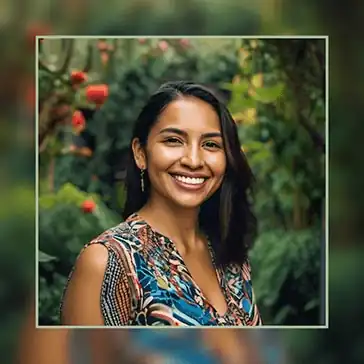
Blur Frame
Create stunning Blur Frame images online within seconds, absolutely free. Perfect for Facebook, Instagram, or any other social media posts
Steps to Create a Blur Frame Image
- Upload your image: Choose or drag & drop your photo in any common format like JPG, PNG, WEBP, or GIF.
- Select the Aspect Ratio: Your photo is instantly converted into a 1:1 square image with a blurred frame background. You can change the aspect ratio based on your needs from the list or use a custom ratio.
- Customize blurred borders: Use the blur intensity slider to fine-tune the blur frame effect for a smooth and evenly applied blur look.
- Adjust image size and position: Use the zoom slider to resize the main image and toggle the lock button to move the main image exactly where you want.
- Add border to the main image: Turn on the border toggle button to apply a solid color border and choose the thickness value and color to match the image.
- Add text overlay: Go to the Apply Text tab and click the “Add Text” button to add overlay text. Choose from the list of fonts and change the color if you want.
- Download blur frame image: Once satisfied, choose the image size and format and click download to get your beautiful image.
Features of Our Blur Frame Tool
- 100% privacy protected: No uploads, no tracking. Fully browser based image processing.
- Smooth blur effect: Applies an even and natural-looking blur frame around your image.
- Easy resize & reposition: Adjust the main image size and move it freely for the perfect fit.
- Custom borders & text: Add borders and text with your choice of colors.
- Original quality download: Maintains 100% image quality with the ORIGINAL download option.
- Format conversion support: Easily convert image format and download in JPG, PNG, or WebP format.
Why Our Blur Frame Tool is the Best
- Effortless perfection: While other editors require multiple steps, our tool instantly creates a square image with a blurred frame, saving you time and hassle.
- Crystal-clear quality: Unlike other tools that compress your image, we maintain 100% original quality so every detail stays sharp.
- Unique options you won't find elsewhere: Resize, reposition, add borders, and overlay text - all in one seamless interface.
- Social-media ready results: Even a simple photo becomes eye-catching and professional, ready to post without extra editing.
- Instant and online: No downloads, no installations - just upload and create the fastest way to get a polished blur frame image.
- Feels like a mini design studio: Everything you need for a stylish image is right in one place - easy, fun, and free.
FAQs - Blur Frame Image Online
What is a blurred frame image?
A blurred frame image is a picture with a soft, blurred background below the main photo. It keeps the original image as is on top of the blur background, making it look nice and attractive looking everywhere you share.
Why use blur frame on my image?
It makes your image look attractive and adds an artistic touch. By adding a side blur photo frame, you can beautifully adjust the dimensions so your image fits perfectly in places where irregular shapes don’t fit, like social media posts, thumbnails, or profile images.
How to add side blur photo frame?
To add a side blur photo frame, upload your image, and the editor will automatically apply a blurred background around it. You can adjust the blur amount and image size to get the look you want.
What can I do with the editor?
The blur frame editor allows all common image formats. You can adjust the blur amount, change the background and top image size, add a border to the top image, add text or a watermark, and download your image in JPG, PNG, or WEBP.
Why use a blur frame photo editor?
A blurred frame photo editor adds a beautiful blur effect to the sides of your image keeping your original image, intact. You can also choose the blur amount & dimensions of the final image, to fit your platform requirement.
Will adding a blurred frame affect image quality?
No. Blur frame is only applied as a background image separate from your main image that stays 100% intact on top as overlay image.
Will my uploaded image be stored?
No. Your uploaded image is not stored on our servers. The blur frame editor works in your browser, and the image is removed automatically after you’re done.
Is the tool free?
Yes. The blur frame editor is completely free and allows unlimited use - no signup or account required.
Why use SquaredImage editor?
Best online blur frame editor with high-quality output. Hassle-free, runs directly in your browser. No download, no installation, no signups needed. It's completely free and instantly accessible on any device. Extremely easy and convenient to use everywhere.